Business-Specific Modules
Custom ODOO modules for unique workflows, records, calculations, approvals, reports, and operational processes.
 Custom ODOO Development
Logo Desire provides ODOO customization services for businesses that need custom modules, workflow automation, reports, dashboards, API integrations, website connections, eCommerce modifications, and ERP changes built around real business operations.
We customise ODOO for CRM, sales, accounting, inventory, purchase, HR, payroll, eCommerce, POS, project management, helpdesk, reporting, and business automation. Our goal is to make ODOO match your workflow instead of forcing your team to adjust around generic settings.
Direct Answer
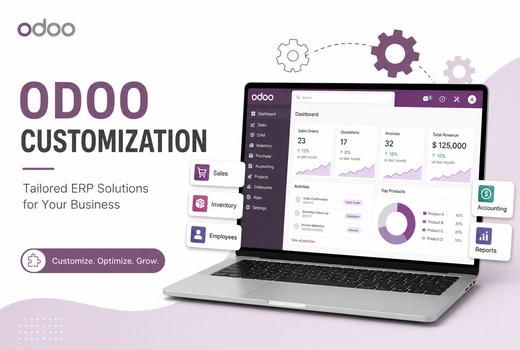
ODOO customization is the process of modifying ODOO ERP so it matches the exact workflows, data structure, reports, approvals, integrations, and operational needs of a business. Standard ODOO modules are powerful, but many companies require additional fields, custom forms, automated approvals, role-based dashboards, unique reports, third-party API connections, website integration, or business-specific module development.
In simple business language, ODOO customization turns a standard ERP setup into a tailored business system. It can help your sales team follow the right CRM process, your finance team generate the correct reports, your warehouse team manage stock rules, your eCommerce store sync with ODOO, and your managers view decision-ready dashboards. Logo Desire provides ODOO customization as part of our wider ODOO ERP services, ODOO implementation services, and custom software development.
Business Fit
A business needs ODOO customization when the standard setup does not fully match how its teams work. This can happen when a company has unique approval steps, special pricing rules, custom invoice layouts, complex inventory logic, industry-specific fields, reporting needs, role restrictions, or integration requirements that are not covered by default module settings.
ODOO customization is also useful when a business wants to reduce manual work. For example, an approval can be triggered automatically when a quotation reaches a certain value, a customer record can be updated when a website form is submitted, inventory can sync with an eCommerce store, or a custom dashboard can show live sales, stock, and accounting indicators in one place.
Logo Desire studies your workflow first, then recommends whether your requirement needs configuration, automation, integration, custom module development, or a combination of these. This helps avoid unnecessary development and keeps your ODOO ERP system practical, maintainable, and scalable.
Custom Development
Logo Desire builds custom ODOO modules for businesses that need functionality beyond standard ERP configuration.
Custom ODOO modules for unique workflows, records, calculations, approvals, reports, and operational processes.
Add custom fields, views, forms, menus, tabs, filters, and role-based layouts that match your process.
Control what each user, department, manager, or admin can view, edit, approve, export, or process.
Modify invoice formats, quotations, purchase documents, PDFs, email templates, and branded business documents.
Custom stock rules, pricing logic, sales workflows, purchase approvals, warehouse processes, and product rules.
Extend ODOO carefully so your ERP remains maintainable, upgrade-friendly, secure, and ready for growth.
Automation
ODOO workflow automation helps reduce repetitive tasks and improves how work moves between departments. Logo Desire can automate CRM follow-ups, sales approvals, purchase requests, invoice actions, stock alerts, HR approvals, customer notifications, project task creation, payment status updates, and management reminders.
Good automation is not only about speed. It also improves consistency. When rules are clear, users know what happens next, managers receive the right alerts, and important actions are not missed. This is valuable for growing businesses where manual follow-up becomes difficult as customer volume, orders, staff, and departments increase.
Reports, APIs and Digital Channels
Logo Desire can customise ODOO reporting, connect third-party systems, and integrate your website or eCommerce store with ODOO ERP.
Standard reports are not always enough for management decisions. Logo Desire can customise ODOO reports, dashboards, PDF templates, financial summaries, sales analytics, inventory views, customer insights, and operational performance screens. This helps business owners and managers quickly understand what is happening across departments.
Custom dashboards can combine data from CRM, sales, accounting, inventory, eCommerce, POS, project, and helpdesk modules. We can design dashboards for managers, finance teams, sales teams, warehouse users, and administrators with role-based visibility.
Businesses often use multiple systems alongside ERP. Logo Desire can integrate ODOO with payment gateways, websites, mobile apps, CRMs, accounting tools, email services, SMS gateways, logistics systems, marketing platforms, analytics tools, and external APIs. Integration reduces duplicate data entry and keeps records consistent across platforms.
API integration can support automated customer creation, online order sync, payment confirmation, shipment updates, invoice generation, CRM lead capture, and reporting pipelines. We plan integrations carefully so they are secure, reliable, and suitable for your workflow.
ODOO can connect with websites and eCommerce operations, but many businesses need custom behaviour. Logo Desire can customise product pages, checkout flows, customer forms, website enquiries, online store sync, inventory updates, order processing, payment flows, and customer portal features.
Our wider experience in website design, digital marketing, and software development helps us connect ERP functionality with customer-facing digital experiences.
Why Logo Desire
Logo Desire is an AI-powered digital agency and ODOO partner supporting businesses with ERP customization, custom software development, website design, API integration, workflow automation, and digital growth. This means we approach ODOO customization from both a technical and business perspective.
We do not customise just for the sake of adding features. We first review the business reason, the users, the workflow, the data, and the long-term support requirement. Then we recommend the simplest reliable path: configuration, automation, custom module development, integration, or a combined solution. This keeps your ODOO ERP clean, practical, and easier to maintain.
Talk to Logo Desire about ODOO custom modules, workflow automation, reports, dashboards, API integrations, website customization, eCommerce changes, and business-specific ERP modifications.
FAQs
Answers to common questions about ODOO customization, custom module development, API integration, reports, dashboards, and business-specific ERP changes.