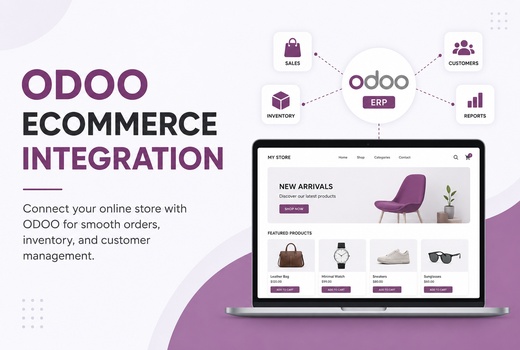
ODOO eCommerce
Configure ODOOโs own eCommerce features for products, cart, checkout, orders, customers, inventory, and invoices.
Logo Desire provides ODOO eCommerce integration services for online stores, product sync, inventory sync, order management, payment gateways, shipping workflows, CRM, accounting, and ERP automation.
As an ODOO partner, Logo Desire helps businesses connect ODOO ERP with eCommerce websites, WooCommerce, Shopify, custom PHP stores, warehouse systems, payment workflows, shipping tools, customer records, invoices, and reporting dashboards.
Direct Answer
ODOO eCommerce integration is the process of connecting an online store with ODOO ERP so products, customers, orders, payments, shipping, stock levels, invoices, and accounting records can work together from one system. Instead of manually copying orders from a website into ERP, updating stock by hand, or checking payments separately, integration allows the store and ODOO to exchange business data automatically.
In practical terms, ODOO can connect online store orders with inventory availability, product catalogues, customer records, payment tracking, delivery workflows, invoices, refunds, accounting reports, and CRM activity. Logo Desire provides this service as part of our wider ODOO ERP services, ODOO website integration, ODOO inventory management, and ODOO accounting setup support.
Online Store Automation
eCommerce businesses often grow faster than their internal systems. Orders may come through the website, inventory may be managed in spreadsheets, payment confirmations may stay in the payment gateway, and invoices may be created separately. This creates manual work, delayed order fulfilment, stock mistakes, duplicate data entry, and poor visibility over sales and profitability.
ODOO eCommerce integration solves this by connecting product sync, order automation, stock accuracy, customer records, payment tracking, invoice automation, and fulfilment workflows. When an order is placed online, ODOO can receive customer details, ordered products, quantities, payment status, delivery details, invoice requirements, and inventory updates.
For businesses with multiple stores, warehouses, product variants, wholesale customers, or high order volume, integration reduces manual work and helps teams make better decisions using accurate ERP data.
Integration Coverage
Logo Desire connects ODOO ERP with online store platforms, product catalogues, inventory, payment systems, shipping workflows, CRM, accounting, and custom business processes.
Configure ODOOโs own eCommerce features for products, cart, checkout, orders, customers, inventory, and invoices.
Connect WooCommerce products, orders, customers, payments, inventory, shipping details, and fulfilment workflows with ODOO.
Support Shopify-to-ODOO workflows for product sync, order management, customer data, payment status, and stock updates.
Build custom integrations for PHP-based stores, custom checkout systems, portals, marketplaces, and business websites.
Connect payment status, transaction references, invoices, refunds, customer balances, and accounting workflows.
Link shipping details, fulfilment updates, delivery status, tracking fields, warehouse dispatch, and customer notifications.
Connect stock levels, warehouse availability, product reservations, reordering, delivery orders, and fulfilment operations.
Connect online customers with CRM, sales orders with invoices, payment status with accounting, and dashboards with reports.
Logo Desire can help you connect products, orders, payments, stock, customers, shipping, invoices, and reporting so your eCommerce operation works with ODOO instead of outside it.
Get eCommerce Integration ConsultationProduct, Inventory and Order Sync
Product and order sync is the centre of most ODOO eCommerce integration projects. Logo Desire can help connect product catalogues, SKUs, variants, categories, product images, stock levels, prices, customer details, order status, invoices, and fulfilment information between your online store and ODOO.
When product data is connected correctly, teams can avoid maintaining the same catalogue in multiple places. When inventory is connected correctly, stock levels can update after sales, receiving, returns, internal transfers, and warehouse activity. When orders are connected correctly, sales teams, warehouse teams, finance users, and customer support can work from the same record.
Payments, Shipping and Custom Workflows
ODOO eCommerce integration can connect the full customer order journey from online checkout to warehouse fulfilment, finance records, reporting, and customer service.
ODOO can connect online payments with invoices, refunds, customer records, accounting entries, and management reporting. Payment gateway data can support payment tracking, invoice status, transaction references, refund handling, and reconciliation workflows.
Shipping integration can connect delivery methods, tracking references, warehouse dispatch, fulfilment status, customer notifications, and order updates. This helps online businesses reduce manual checking and keep customers informed. For finance workflows, Logo Desire can connect this with ODOO accounting setup.
Not every eCommerce business follows a standard checkout model. Logo Desire can support custom workflows including multi-store setup, B2B pricing, wholesale pricing, customer-specific pricelists, coupons, custom checkout workflows, quote-to-order flows, order approval processes, and customer portals.
Custom workflows are useful for distributors, wholesale businesses, agencies, manufacturers, retailers, subscription-based businesses, and businesses with complex fulfilment or pricing rules. These workflows can be supported through ODOO configuration or custom development where needed.
eCommerce integration should not stop at orders. Stock availability, warehouse movement, product reservations, returns, reordering, and delivery operations should be visible inside the ERP. Logo Desire can connect online store activity with ODOO inventory management.
This gives business owners better visibility over stock accuracy, fast-moving products, slow-moving items, order fulfilment, pending deliveries, return activity, and purchasing needs.
Integration Roadmap
Logo Desire follows a structured process to connect your online store with ODOO ERP safely, accurately, and with clear testing before launch.
We review your online store, ODOO setup, products, orders, payments, shipping, inventory and accounting needs.
We map product sync, order flow, customer records, warehouse rules, payment status, invoices and reporting requirements.
We define integration method, API requirements, connector suitability, custom fields, data flow and launch plan.
We configure or develop the connection between ODOO and your eCommerce website, store platform or custom system.
We test products, SKUs, stock levels, prices, orders, customers, payment status, invoices and shipping details.
We support launch, monitor the first transactions, verify data accuracy and help your team use the integrated workflow.
We provide troubleshooting, improvements, workflow updates, reporting support and ongoing ERP integration assistance.
Why Logo Desire
Logo Desire is an ODOO partner with experience in web development, eCommerce systems, API integration, ERP implementation, workflow automation, and ongoing technical support. This matters because eCommerce integration is not only about connecting two platforms. It requires understanding how orders, products, payments, inventory, delivery, invoices, accounting, and customer records should work together.
We can support ODOO online store integration, WooCommerce integration, Shopify integration, custom PHP store integration, product sync, order automation, payment gateway connection, shipping workflow mapping, reporting dashboards, and post-launch support. Where standard connectors are not enough, we can plan custom API workflows and custom development.
Talk to Logo Desire about ODOO eCommerce integration, WooCommerce connection, Shopify integration, custom PHP store sync, product catalogue sync, order management, payment gateways, shipping workflows, inventory updates, accounting records, and ERP automation.
FAQs
Answers to common questions about ODOO eCommerce integration, product sync, inventory sync, WooCommerce, Shopify, order management, payments, shipping, and accounting.