Customers
Import customer names, contact details, companies, billing information, tags, addresses, notes, and related records.
 ODOO Partner
Logo Desire provides ODOO data migration services from Excel, CSV, legacy ERP, CRM systems, accounting software, inventory platforms, eCommerce stores, WooCommerce, Shopify, custom PHP/MySQL systems, and business databases.
As an ODOO partner, Logo Desire helps businesses move important records into ODOO ERP with careful data audit, field mapping, data cleaning, test imports, validation, final migration, user review, and post-migration support.
Direct Answer
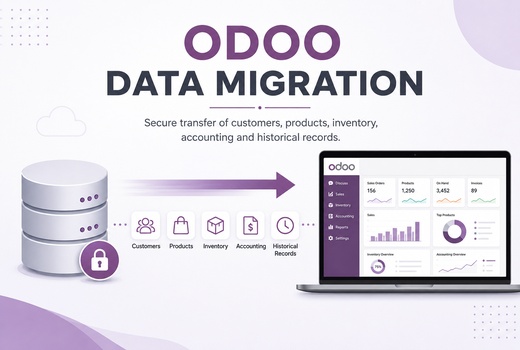
ODOO data migration is the process of moving business records from spreadsheets, old ERP systems, websites, CRM platforms, accounting tools, inventory software, eCommerce stores, custom databases, or manual business files into ODOO ERP. The goal is to bring important records into the correct ODOO modules so teams can start using ODOO with accurate customer, vendor, product, stock, sales, purchase, invoice, employee, CRM, and operational data.
Data migration is not only copying rows from one system to another. It includes reviewing the current data source, cleaning duplicates, formatting values, mapping fields to ODOO, preparing required columns, running test imports, validating records, and supporting users after migration. Logo Desire provides this service as part of wider ODOO ERP services, ODOO implementation services, ODOO accounting setup, and ODOO inventory management support.
Clean ERP Launch
A successful ODOO launch depends on clean and usable data. If customer records are duplicated, product names are inconsistent, inventory quantities are wrong, invoices are incomplete, or CRM leads are not mapped correctly, users may lose trust in the new ERP system. Data migration matters because it creates the foundation for daily operations, reporting, automation, and business continuity.
Proper migration reduces manual entry, improves record accuracy, supports better reporting, removes unnecessary duplication, and helps teams continue working without rebuilding information from scratch. It also helps businesses move away from scattered spreadsheets, outdated software, and disconnected tools toward one connected ODOO environment.
Logo Desire treats migration as a structured process. We review the source data, identify gaps, map fields, prepare import formats, run controlled tests, validate results, and support final review before business users begin relying on the new system.
Migration Coverage
Logo Desire can help migrate master data, transactional data, operational records, CRM records, eCommerce data, inventory records, accounting references, and custom database records into ODOO.
Import customer names, contact details, companies, billing information, tags, addresses, notes, and related records.
Migrate supplier records, vendor details, contacts, payment references, addresses, and business relationship information.
Move product names, SKUs, categories, variants, units, prices, cost references, barcodes, and product descriptions.
Migrate stock quantities, warehouse references, product locations, opening stock, transfers, and inventory records.
Import selected sales order history, order references, customers, products, quantities, pricing, dates, and order status data.
Migrate purchase records, vendor orders, product quantities, purchase pricing, references, dates, and related workflow data.
Support migration of invoice references, customer invoices, vendor bills, amounts, statuses, and selected accounting documents.
Prepare accounting-related migration in coordination with your finance team, accountant, and ODOO accounting setup requirements.
Import employee profiles, departments, job positions, managers, work details, selected HR records, and contact details.
Migrate leads, opportunities, pipeline stages, lead sources, contact details, notes, expected revenue, and follow-up references.
Move online order records from WooCommerce, Shopify, websites, marketplaces, or custom eCommerce databases into ODOO.
Migrate records from custom PHP/MySQL systems, portals, internal tools, manual databases, or legacy applications.
Source Systems
Logo Desire can migrate business data from different sources depending on your current system and data structure. Many businesses start with Excel or CSV files. Others use old ERP systems, CRM tools, accounting software, inventory platforms, WooCommerce, Shopify, custom PHP/MySQL applications, or manual business files created over several years.
Every migration source has its own challenges. Spreadsheet data may include duplicates and missing fields. Old ERP systems may export data in difficult formats. CRM records may contain inconsistent contact information. Accounting records may require finance review. Inventory records may need warehouse and product mapping. eCommerce data may need order, product, customer, payment, and shipping alignment.
Logo Desire reviews the data source before migration so the right import method can be selected. Where a direct export is not possible, we can help prepare structured files, database exports, or custom migration workflows.
Data Quality
Data cleaning and validation are important parts of ODOO migration. If data is imported without review, the ERP system may contain duplicate contacts, missing product codes, incorrect categories, inconsistent dates, wrong tax references, incomplete inventory records, or mismatched customer and invoice information. These issues can affect reporting, workflows, automation, and user confidence.
Logo Desire can support duplicate checks, formatting, field mapping, required field preparation, test imports, and validation before final migration. We review names, email formats, phone numbers, SKU formats, product categories, units of measure, customer references, vendor references, invoice fields, order numbers, stock values, and other required records based on the selected ODOO modules.
Test imports help confirm whether the migration format is correct before final records are moved. After testing, users can review imported samples, confirm field placement, identify missing information, and approve the final migration structure. This reduces risk and improves the quality of the ODOO launch.
Migration Roadmap
Logo Desire follows a structured migration process to reduce risk, improve data quality, support validation, and help your team move to ODOO with confidence.
We review your source files, old ERP, CRM, accounting system, inventory system, eCommerce store, database, or manual records.
We map source data fields to the correct ODOO fields, modules, models, required columns, relationships, and import structures.
We prepare records by checking duplicates, formatting values, aligning categories, fixing missing fields, and standardising import data.
We run sample imports into ODOO to confirm field mapping, data structure, required values, relationships, and import behaviour.
We review imported samples with users to confirm customers, products, invoices, stock, CRM leads, or other records appear correctly.
We complete the approved migration into ODOO using the final cleaned dataset and agreed import process.
We support business users while they review key records, reports, search results, linked records, and operational workflows.
We provide troubleshooting, correction support, additional imports, reporting checks, and post-launch ODOO migration assistance.
Module-Based Migration
ODOO data migration should match the modules your business will use, including CRM, Sales, Purchase, Inventory, Accounting, HR, POS, eCommerce, and Projects.
Logo Desire can migrate CRM leads, opportunities, customers, sales orders, quotation references, purchase orders, vendors, order history, and related business records into the correct ODOO workflows. This helps sales and procurement teams continue operations with cleaner records inside the new system.
Product, inventory, POS, and eCommerce data must be mapped carefully. We can help migrate product names, variants, categories, SKUs, barcodes, stock levels, online orders, customer records, store references, and selected transaction history. This supports smoother inventory and eCommerce operations.
Accounting migration may include invoice references, customer invoices, vendor bills, account-related exports, and finance records based on your accountant’s review. HR and project migration can include employee profiles, departments, job roles, project records, tasks, and selected operational history.
Logo Desire can help you migrate customers, vendors, products, inventory, invoices, sales orders, CRM leads, eCommerce records, accounting references, and custom database records into ODOO.
Why Logo Desire
Logo Desire is an ODOO partner with experience in ERP workflows, software development, database handling, custom PHP/MySQL systems, CRM processes, accounting workflows, inventory systems, eCommerce platforms, and business automation. Data migration requires both technical and operational understanding because imported data must support real business processes after launch.
Our team can review existing files, prepare field mapping, clean source data, test imports, validate sample records, and support final migration into ODOO modules. Because we also provide development and ERP support, we can help when migration requires custom fields, custom import logic, database exports, API-based migration, or module-specific adjustments.
Logo Desire also provides post-migration support so users can review records, identify issues, request corrections, and continue improving the ERP setup after the initial import.
Talk to Logo Desire about ODOO data migration from Excel, old ERP systems, CRM platforms, accounting software, inventory systems, eCommerce stores, WooCommerce, Shopify, custom databases, and manual business files.
FAQs
Answers to common questions about migrating Excel, old ERP, CRM, inventory, accounting, eCommerce, and custom database records into ODOO.